Welcome to the integration documentation. This guide will walk you through the step-by-step process of connecting, testing, and validating your MyPVit API implementation in our Sandbox environment before going live.
Prerequisites & Identifiers
Before you start coding, gather your unique identifiers. You can find them in your merchant dashboard.
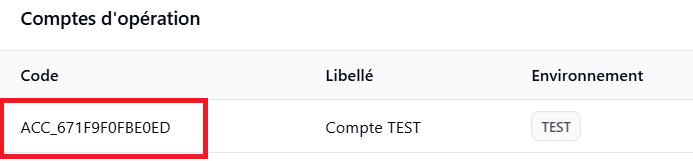
Operation Account Code (Test Environment)
It identifies the settlement wallet and the targeted group of operators. In the Sandbox environment, you must use the default Test account.
Retrieve the code for the 'Compte TEST'. It starts with ACC_
API Token
Every HTTP call requires a valid access key (or token) linked to your operation account. To retrieve this key, you will use the Renew Secret Key API. You must first set a password for this API.
Go to APIs. Set a strong password and keep it safe.
Retrieve your 'URL Code'.
Notification Webhook (Callback)
The Callback is an asynchronous request (Webhook) that MyPVit sends to your server to inform you of the final status of a transaction. You must configure it.
{
  "status": "PENDING",
  "status_code": "200",
  "operator": "AIRTEL_MONEY",
  "reference_id": "PAY260226747050",
  "merchant_reference_id": "V4cHobJKUt",
  "merchant_operation_account_code": "ACC_673B22D1077EA",
  "message": "Your payment request V4cHobJKUt has been successfully initiated and is being processed. Please wait for the final status of your transaction."
}
Integration Best Practices
Asynchronous Processing: Never rely solely on the PENDING status of the API response to validate a payment. Always wait for the final confirmation (SUCCESS or FAILED) on your notification URL (Webhook).
Idempotency: Ensure that your callback route is capable of processing the same notification multiple times without double-crediting the customer. Always use your `merchant_reference_id` to check if the transaction has already been processed in your system.
What if the Callback is not received? Never consider a transaction failed or successful based only on the absence of a callback. If you receive no notification after a reasonable delay (e.g., 3 minutes), the transaction status is uncertain. In this case, you must imperatively query our Check Status API to retrieve the final status of the transaction.
3. Webhook Reception (Callback)
Once the transaction is processed by the mobile operator, PVit immediately sends a notification (Webhook) to the callback URL you provided in the initial request. This notification contains the final and definitive status of the transaction (SUCCESS or FAILED) along with all operation details.
To confirm that your system has successfully received the notification, your server must respond to our POST request with an HTTP 200 OK code and return a JSON object containing an echo of the `transactionId` and the `code` received.
Dynamic Echo (Do not hardcode): You must dynamically extract the transactionId and code attributes from the incoming payload to return them as they are in your response. Never hardcode the value of the code field (e.g., systematically writing 200). Simply return the exact value transmitted by PVit, as it may change depending on context or future API updates.
Guarantee of Proper Integration: Responding correctly to this callback is fundamental. It is the only way for our platform to ensure that the API integration is correct and that your servers are communicating perfectly with ours.
Test Validation Condition: During your integration phase, please note that your simulations will only be considered valid and complete if you have correctly handled this callback. A successful payment initiation request is not enough to validate your tests; the technical loop must be closed by sending this acknowledgement.
4. Transaction Simulation: Failure Scenario
It is crucial to test your application's resilience against declined payments (insufficient funds, customer cancellation, etc.). To force a failure scenario, simply initiate a payment request with an amount strictly greater than 1000 XAF.
To validate this step of your integration, you must:
Perform at least two failed transaction simulations.
Correctly process the associated Callback by sending the required dynamic acknowledgement (just like for the success scenario).
To definitively validate your integration and ensure optimal security and reliability for your users, implementing the following two APIs is mandatory:
KYC API (Know Your Customer)
This API allows you to verify the identity of the customer before initiating any sensitive transaction. It is an essential step to secure your flows and prevent fraud risks.
Check Status API
This API allows you to retrieve the final state of a transaction. it acts as an absolutely essential fallback mechanism in case your system did not receive the notification Webhook.
6. Integration Checklist
Before switching to production, please ensure that your integration perfectly meets our technical requirements.
Integration Checklist:
At least 2 successful simulations (amount < 1000 XAF) performed and validated.
At least 2 failure simulations (amount > 1000 XAF) performed and validated.
Compliant handling of the Webhook (Callback) for each transaction, with the mandatory dynamic acknowledgement (HTTP 200 + echo of transactionId and code).
Functional implementation of the KYC API.
Functional implementation of the Check Status API.

 MyPVit Docs